Claudes
A desktop IDE for Claude Code.
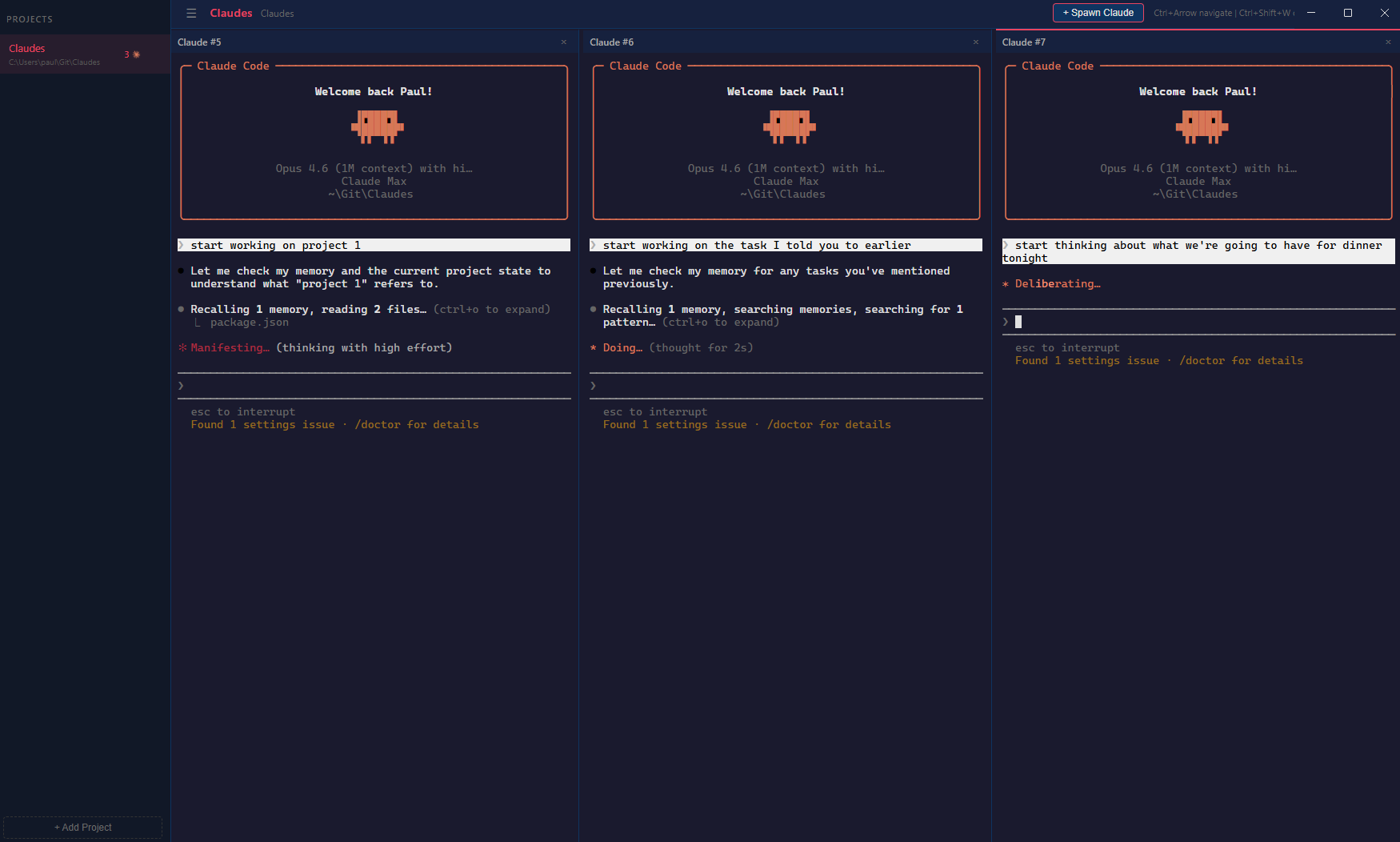
Run multiple AI coding agents side-by-side in a proper workspace. Built because I was using Cursor as a glorified terminal organiser and decided life was too short for that.
Why I Built This
I run a lot of Claude Code sessions. On any given day I might have three or four going across different projects — one working on Task Board, one on TestPlan, one reviewing a pull request, one doing something experimental.
I was using Cursor to organise them — but I wasn't using any of Cursor's AI features. Not the autocomplete, not the inline chat, not the code editing. Just the terminal panes. That's like joining a gym for the car park.
So I opened Claude Code, described what I wanted, and it built the whole thing in an afternoon. The first commit landed at 4:14 PM. By 5:43 PM I had a v1.0.0 release with an installer on GitHub. By the next day it had a file explorer, a git client, a usage dashboard, and an auto-updater. Thirty-two commits in twenty-two hours.
How It Works
Download. Point at your projects. Spawn some Claudes.
Add Your Projects
Point Claudes at your project directories. Each gets its own workspace with persistent sessions.
Spawn Claudes
Hit Ctrl+Shift+T to spawn a new Claude Code instance. Arrange them in columns and rows. Resize as you like.
Work
Switch between projects without losing running sessions. Close the app and your sessions resume on restart.
Multi-Column Terminals
Run as many Claude Code sessions as your screen (and your API bill) can handle. Arrange them in columns and rows with draggable resize handles.
- Resizable columns and rows
- Keyboard navigation between panes
- Activity indicators show which Claude needs attention
- WebGL-rendered terminals for crisp text
Task Board
3 sessions · 1 waiting for input
TestPlan
2 sessions · all working
CoSurf
1 session · idle
Project Workspaces
Organise your Claude sessions by project. Switch between them instantly without losing running sessions. Each project remembers its layout and restores it on startup.
- Per-project session persistence
- Sessions resume automatically on restart
- Session titles from your first message
- Background sessions stay alive when switching
Explorer
Files
Git
Built-in Explorer & Git
Browse your project files, manage git operations, and edit CLAUDE.md without leaving the app. Because switching windows is the enemy of flow.
- File browser with project tree
- Full git: stage, commit, branch, stash, push, pull
- Visual diffs and commit history
- Launch configurations from VS Code and .NET
Usage Dashboard
Input Tokens
2.4M
Output Tokens
890K
CO2 Equivalent
1.2 mi
Usage Analytics
See exactly how much AI you're consuming across all your sessions and projects. Token counts, per-model breakdowns, daily trends, and environmental impact estimates — because someone should be keeping score.
- Aggregated token usage across all sessions
- Per-model cost and energy breakdown
- Daily and session-level detail
- CO2 equivalent estimates per model
Under the Hood
Built with Electron, xterm.js, and node-pty. No native module headaches.
Separated PTY Server
node-pty runs under system Node.js in a separate process, connected via WebSocket. No electron-rebuild, no ABI mismatches, no suffering.
WebGL Rendering
Terminals render via xterm.js with the WebGL addon for gap-free block characters and smooth performance across multiple panes.
Auto-Updates
New versions are published to GitHub Releases and downloaded automatically in the background. Install once, stay current.
Keyboard Shortcuts
Ctrl+Shift+T
Ctrl+Shift+W
Ctrl+Left/Right
Ctrl+Shift+R
Ctrl+B
Ctrl+Shift+C/V
Free. Open Source. Built in a Day.
Download the installer or build from source. Contributions welcome.
Requires Claude Code CLI on your PATH